
Appearance
Volume pricing tiers
Wholesale prices usually drop as the quantity climbs. Wonpa reads those breaks from Shopify and shows buyers the full ladder — what a unit costs now, and what it costs at the next tier up.
Tiers come from Shopify quantity price breaks, set on your B2B catalogs. The theme reads them; it doesn't create them.
Note
Quantity price breaks ship with Shopify's B2B features, which are available on every Shopify plan. Until a product has breaks set, the theme falls back to a wonpa.tiers product metafield if present, and otherwise shows a single price.
Before you start
Native price breaks reach the storefront through the signed-in buyer's catalog, so all of the following have to be true in your Shopify admin before a table built from them can appear. The wonpa.tiers fallback described below needs none of it — that is the point of the fallback.
- A catalog holds the products, with volume pricing entered on them. Price breaks are set under Markets → Catalogs, not on the product itself: select the catalog, then Manage → Manage products and pricing, and add breaks in the Volume pricing column. See setting up quantity rules and volume pricing in B2B.
- That catalog is assigned to the buyer's company location. Breaks are read in the context of the catalog the buyer is ordering against, so a buyer with no company location behind them has none. See customizing B2B pricing using catalogs.
- The buyer is signed in. Break prices belong to a catalog, and a guest is not ordering against one.
Note
Shopify allows at most ten price breaks per product, so a table built from native breaks tops out at ten bands plus the base row. The wonpa.tiers metafield path has no such ceiling, but it is display-only.
Turning the table on
- Open Theme settings → Wholesale.
- Turn on Show volume pricing table.
The table then appears inside the Price block on any product that has quantity price breaks (or a tiers metafield). Products without breaks show a plain price.
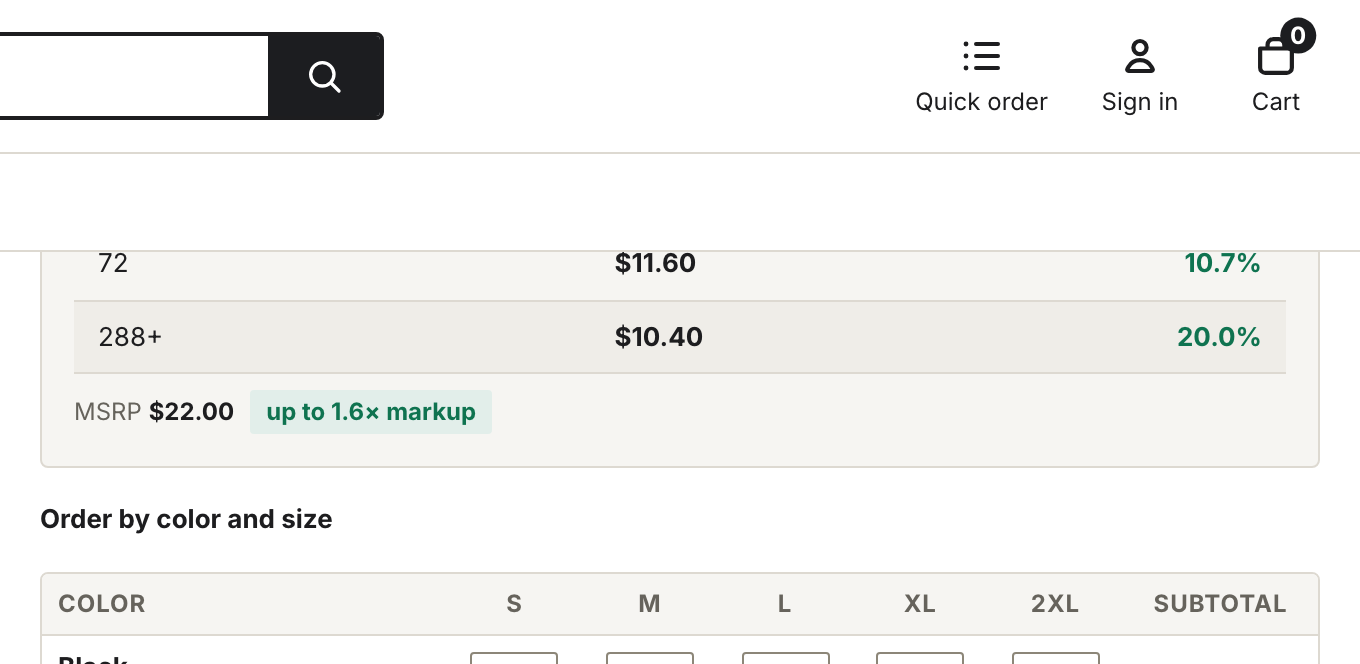
The volume pricing table inside the Price block.
What the table shows
The table has three columns: Units (any mix), Price / ea, and You save. What fills the rows depends on where the tiers come from.
With native Shopify quantity price breaks, each row is a quantity band. The first row is the base band from the quantity rule minimum up to the first break, priced at full unit price with no discount. Each break below it shows its band, its per-unit price, and the percent saved against the base price. The last row runs open-ended (144+) and is highlighted as the tier the largest orders reach.
With a wonpa.tiers metafield, each row is one tier from the metafield, in the order you listed them. The Units cell shows that tier's minimum on its own (24, not a range), with a + added on the last row only. No base row is built from the quantity rule minimum — add a full-price tier yourself if you want one. Savings are measured against the first tier's price, so the first row always reads as no discount.
The price shown at the top of the block is the lowest break's per-unit price when the product has native breaks, and the line under it reads "/ ea at N+ units". On the metafield path the headline stays the variant's own unit price and the line reads "/ ea".
Under the matrix
On two-option products the size matrix prices each size line by its own quantity, exactly as Shopify charges it at checkout — so the grand total in the summary bar always matches the cart. As the buyer types, the bar shows the effective price per unit across the whole order ("@ $12.80/ea").
If your store prices a size run by its combined quantity instead — one tier for the whole order, regardless of how units split across sizes — set a wonpa.tiers product metafield (a JSON list of min/price bands). Prices are in cents: 1300 renders as $13.00. The bar then coaches toward the next combined tier and how many more units reach it. Native Shopify quantity price breaks take precedence — on a product that has them, the metafield tiers are ignored. This mode assumes you enforce the same whole-run pricing at checkout (for example with a cart transform); without native Shopify breaks, the theme can only display it.
One consequence worth knowing before you set the metafield: the quick order page does not read it. That page prices from Shopify's own breaks only, so the same product shows the plain unit price there and the tier price in the matrix. Quick order is the surface matching what Shopify will charge — if you want the two to agree, use native quantity price breaks instead of the metafield.
On product cards
Cards in collections and search show a condensed version: the base quantity band at full price, then the best break's band, per-unit price, and percent saved. When a product has breaks but the shown variant has none, the card carries a "Volume pricing" tag instead of the mini table.