
Appearance
Cart and drawer
The cart holds what a buyer is about to order. Wonpa can show it two ways: a drawer that slides in from the side, or a full cart page. B2B carts often hold many sizes of the same product, so the theme groups lines to keep them readable.
Choose drawer or page
- Open Theme settings → Cart.
- Set Cart type to Drawer or Page.
Drawer slides the cart in from the side. Page sends shoppers to the full cart page. With Drawer selected, the cart opens on its own each time a buyer adds a product. With Page selected, the cart icon links straight to the cart page and nothing slides in.
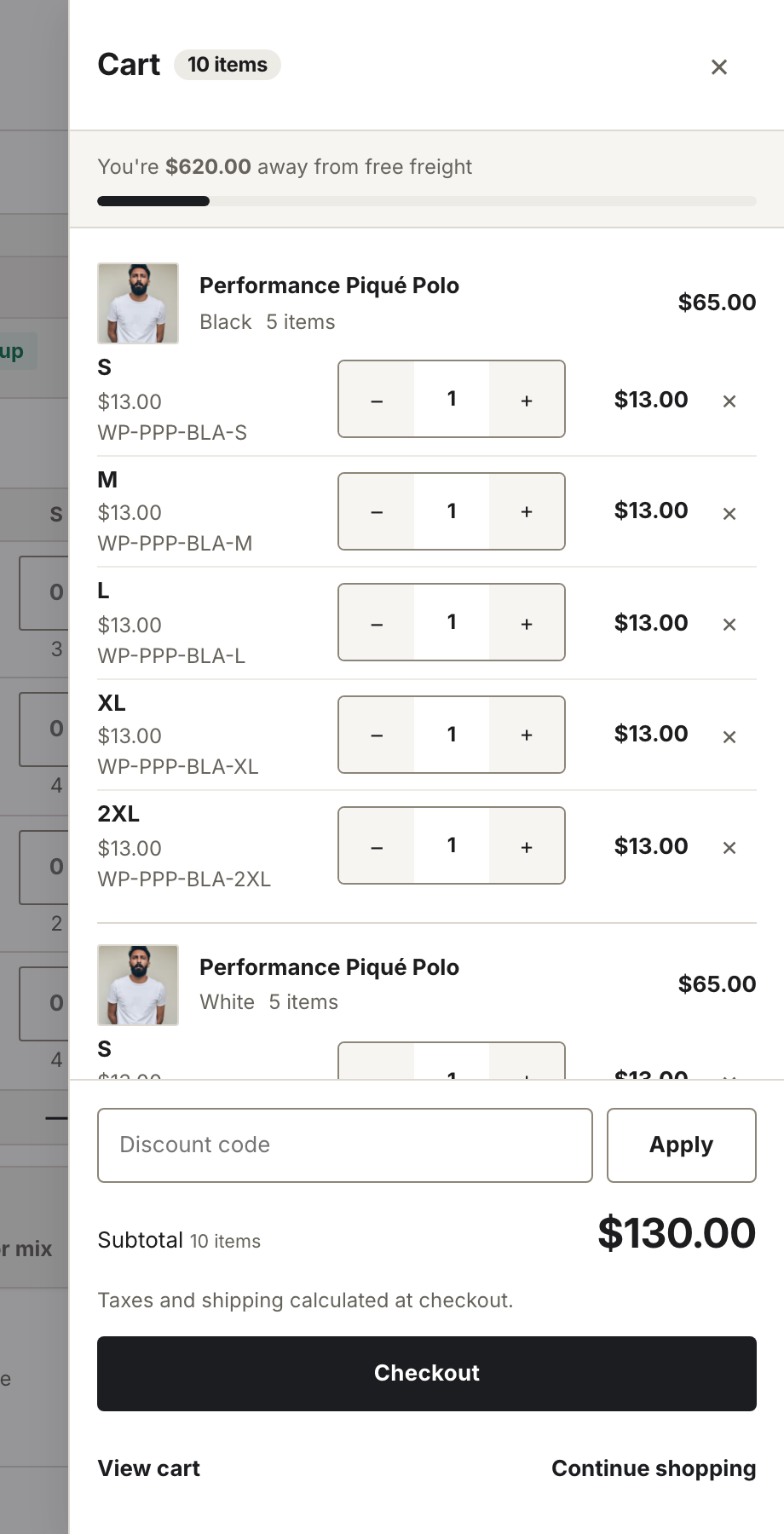
The cart drawer, shown when Cart type is Drawer.
Grouped lines
Lines that share a product and color collapse into one card: a header with the image, title, color, a unit count for the whole group, and the group subtotal, then a compact sub-row for each size. The sub-row carries the size, unit price, a quantity stepper, the line total, and a remove control.
Grouping is a display choice only. Each size stays its own cart line — every row keeps its own quantity, its own quantity rules, and its own remove. Removing one size leaves the rest of the group in place.
This same grouping renders in both the drawer and the cart page. On the page, the group header sits above its sizes as table rows.
Quantity notices
Two notices explain a quantity change that didn't land the way the buyer asked. Both appear in the drawer and on the cart page, and neither needs a setting.
- Shopify caps a requested quantity to what's actually in stock without reporting an error. The theme compares what was asked for against what the cart came back holding, and shows "Only [count] in stock" when it was reduced.
- Pressing minus on a line already at its minimum quantity rule would clamp straight back, so nothing moves. The theme shows "Minimum of [min]" instead, so the buyer knows why.
Product preview
Hovering or keyboard-focusing a line's product title or thumbnail floats a small card beside it: the product image, price, a count of values per option ("Color: 4 · Size: 5"), the opening of the description, and a sold-out tag if the product is unavailable. It reads the product directly, so there is nothing to configure.
The card needs a precise pointer, so it is skipped on touch screens, where there is no hover. The same card appears on the quick order page, on search results and on filled rows.
Order notes
The cart page can show a free-text note field. Turn it on with Show order notes on the Cart section in the theme editor. The note field appears on the cart page only, not in the drawer. For structured purchase-order details, use the dedicated fields below instead — they arrive on the order as separate, labelled values rather than a paragraph you have to read.
Purchase order fields
Wholesale buyers almost always order against a PO number, and often need to say when and where the freight should land. The Cart section ships three fields for that, each switchable on its own under Purchase order fields:
| Setting | Field | Saved on the order as |
|---|---|---|
| Show PO number field | Single-line text | PO number |
| Show requested delivery date | Date picker, no past dates | Requested delivery date |
| Show receiving instructions | Multi-line text | Receiving instructions |
All three ship on, and each can be turned off on its own. All three render on the cart page only, in the same column as the order note.
Each field saves when the buyer leaves it — clicking or tabbing away, or pressing Enter in a single-line field — not on every keystroke. The value is stored on the cart rather than held in the form, so it survives leaving the page, and it reaches checkout through accelerated buttons (Shop Pay, PayPal) as well as the normal Checkout button.
On the order, the values appear in Shopify admin under Additional details, each under its own label.
Note
Order confirmation emails do not include these values out of the box. Shopify's notification templates only render what you tell them to — if you want the PO number in the buyer's confirmation email, add it in Settings → Notifications. The theme cannot change notification templates.
Note
These fields are collected by the theme, so they are advisory — nothing blocks a checkout with an empty PO number. If your account terms require a PO, enforce it in checkout (a Shopify Plus checkout rule or a validation app), not here. Stores on Shopify's B2B features also get a PO number field in checkout itself for company-location orders; the theme fields are aimed at wholesale stores running on customer tags instead.